Plan your week, build the workout, and run it as written
A coach can write a useful workout in a chat, and it can still disappear. You scroll up three days later, cannot find the intervals, guess at the targets, and never compare what happened with what the workout was meant to do. The prescription died in the chat history.
That is the problem we have been working on this summer. Calendar and workout planning now connect the full loop in Train Ultra. You and Coach make a training decision, or you build the workout yourself. That decision becomes a structured Planned Workout. It lands on Calendar, moves to your Garmin or a workout file, links to the completed activity, and gives Coach the original plan when it evaluates the session.
Calendar started rolling out on July 22. The full web planning Calendar followed on August 9. On August 12, we added Rest Days and rebuilt the web Workout Builder for faster direct editing.
What a week looks like
Say you are planning the weekend on Tuesday. You select Saturday in Calendar and choose Ask Coach. Coach opens a focused planning conversation for that date, uses the training context it already has, and creates a structured run with a warmup, intervals, recoveries, and a cooldown.
You can open the workout in Builder and change a target yourself. If Saturday gets busy, drag the workout to Sunday on the desktop Calendar. Train Ultra updates the scheduled Garmin workout. You run it on Sunday, the completed activity links to the plan, and one detail shows the workout data, Coach evaluation, planned-versus-completed values, and original prescription.
You can also mark a Rest Day. Calendar records recovery as a separate plan without workout steps.
The plan is no longer a block of text you need to find again. It stays attached to the work.
Choose Coach, Builder, or Rest Day
The Add menu has three commands.
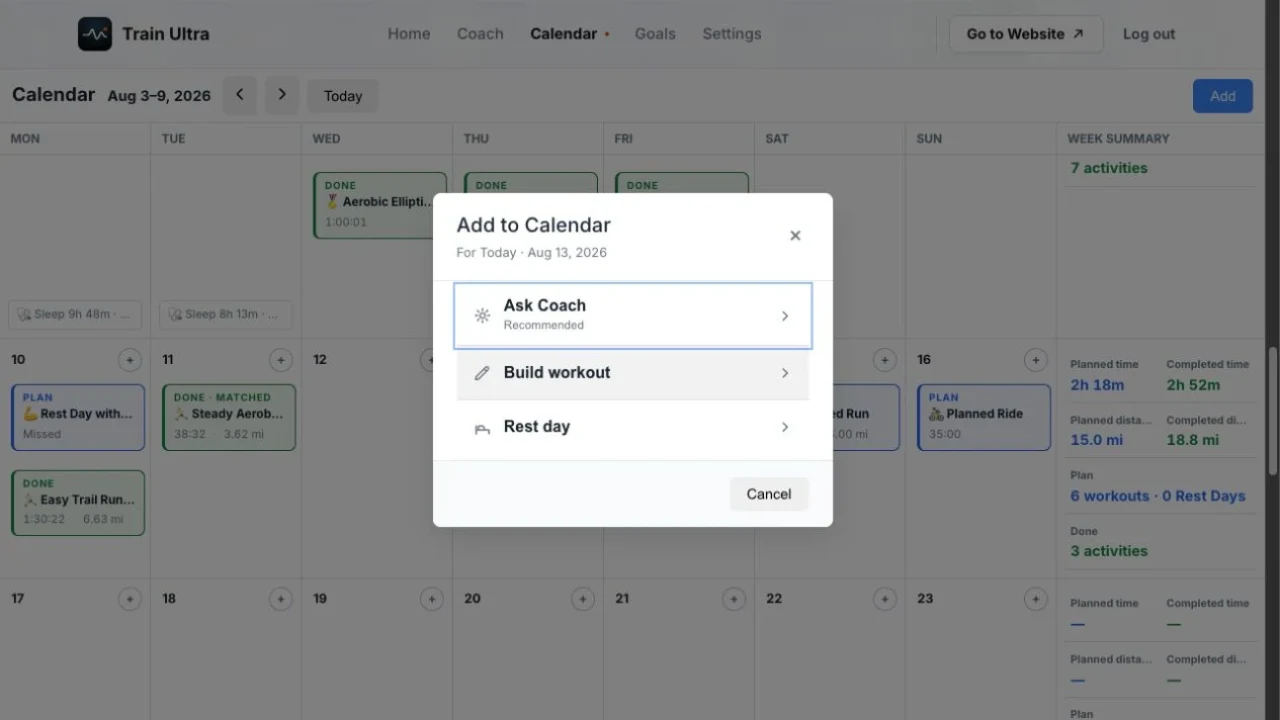
Ask Coach starts a planning conversation for the date you selected. You can describe the session in normal language, ask questions, and refine it with Coach. When Coach creates or changes the workout, the conversation shows the current workout and keeps the discussion in your Coach history.
Build workout puts every step in your hands. Builder supports structured running and cycling workouts. You can add warmups, work, recovery, cooldown, and rest steps. You can build repeat blocks, set time or distance, and use heart rate, pace, power, or cadence targets.
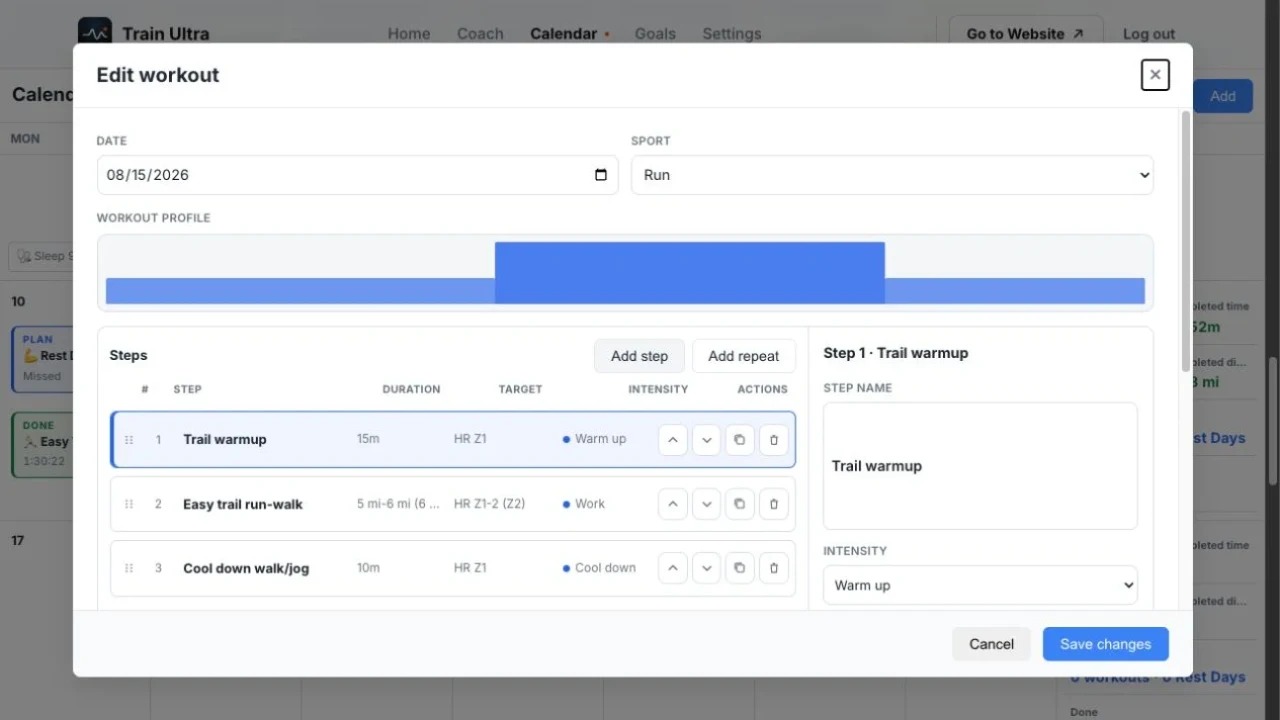
The rebuilt Builder keeps the workout profile above a compact ordered step list. Select a step and edit it in the inspector. Drag a row to move it, use the keyboard controls when you prefer them, or duplicate it before changing the target. Repeats stay continuous in the profile instead of breaking the chart into separate blocks. Press Command-Enter on a Mac or Control-Enter on Windows to save.
Rest day adds a separate Rest Day to Calendar. It has no workout steps, file export, or Garmin sync. You can add it directly or ask Coach to plan recovery with the rest of your week.
Coach and Builder work on the same current version of a new structured run or ride. If you change a target in Builder and return to Coach, Coach sees your change. It does not rebuild the workout from an older copy. Older prose-only plans stay as prose, and sports other than running and cycling use a smaller editor for the date, sport, and notes.
See the plan beside the work
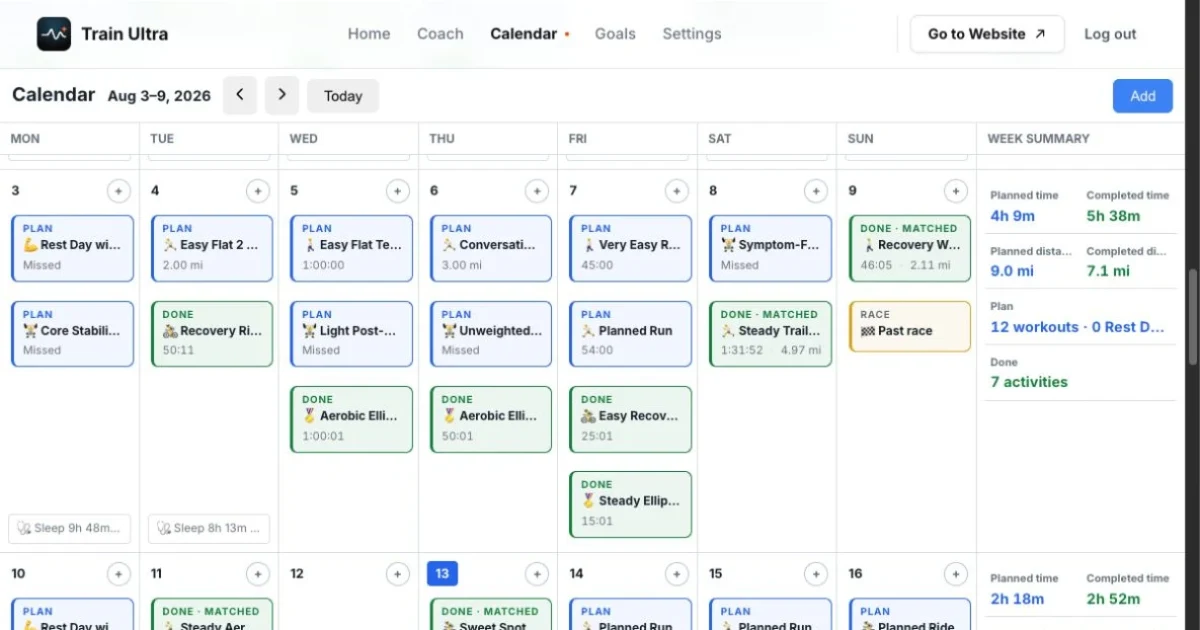
Calendar brings Planned Workouts, Rest Days, completed activities, wellness, and race dates onto one timeline. A linked plan appears with its completed activity, so you do not see two copies of the same workout. Open that card and Train Ultra leads with the completed result and Coach evaluation, then shows planned-versus-completed values and the original prescription. A past plan without an activity gets a quiet Missed state. It is information, not a judgment.
On desktop, Calendar becomes a Monday-through-Sunday planning grid. Each week shows planned time, planned distance, workout count, and Rest Day count beside completed time, distance, and activity count. You can scroll through past and future weeks and drag an unlinked Planned Workout to a new date.
Train Ultra keeps planned time and distance separate. It does not turn miles into minutes or invent a total for an open step or an older prose plan. A linked workout also cannot be dragged because it is attached to a completed activity. Unlink it first, or change the date in the workout editor.
The rebuilt Builder and Rest Day controls are on the web. The iOS Calendar keeps Planned Workouts, completed activities, wellness, and races in a phone-sized month and feed view, with recent Calendar data available offline. Android has Calendar in the Firebase beta, but it is not a public release yet.
Run the workout as written
An eligible structured run or ride can sync to Garmin Connect and your Garmin calendar. Create it, move it, change the structure, change the title, or delete it, and Train Ultra updates Garmin. A notes-only change stays in Train Ultra and does not send needless work to your watch.
If you do not use Garmin, web Calendar can download supported workouts as .fit or .zwo files. Both formats come from the same structured workout used for Garmin delivery.
Some workouts cannot move safely into every file format. Open steps and some distance or mixed-duration structures can lose important parts of the prescription. When Train Ultra cannot preserve the workout, it refuses the export instead of giving your watch a different session.
Review what happened
After the workout, Train Ultra links a completed activity automatically when it finds one clear plan on the same local date and for the same sport. When more than one plan could match, it leaves the activity unlinked instead of guessing.
You can fix a missed match from either the activity or the Planned Workout. The first successful manual link also requests a new evaluation, so Coach can review the activity with the plan, your workout data, your feedback, and the training context it already knows.
This is the part I care about most. Coach can now compare what you did with what the workout was for. The plan is still a working decision, not a command. If your training or recovery changes, Coach can tell you when the plan should change too.
Plan the next workout
Open Calendar, select a date, and choose your path. Builder, Calendar, Rest Days, activity linking, and web workout-file downloads are free. Coach planning and Garmin workout sync require a trial or Pro plan.
I hope this helps you get the workout out of the chat and onto the road.
Written by Wade Wegner. Train Ultra is a private AI coach that reads every workout from Garmin, COROS, Apple Health, or Health Connect. Try it free.